Star Tracker - Mobile Sky Map
- 4.5
- Rating
- 10.00M
- Installs
- Free
- Price
 Analysis by App-foxy
Looking up at the sky is easy; understanding what you are seeing is much harder. Star Tracker - Mobile Sky Map turns that moment of uncertainty into a guided exploration tool, helping me identify stars, planets and constellations through a phone-based view of the night sky. I found it most enjoyable when I used it as a companion outdoors rather than as a replacement for a proper astronomy reference.
It is an education app from PYOPYO Studio, available free of charge, with optional in-app purchases priced from $0.99 to $2.99 per item. That distinction matters: you can try the central experience without paying, while the optional purchases provide a way to spend a small amount if the app becomes part of your regular stargazing routine. The app is marked suitable for Everyone, so it is also approachable for families introducing children to the sky.
Its long presence on mobile is reflected in its release date of June 12, 2014, and its broad audience is reflected in more than ten million installs. It holds a 4.6 average from around eighty-one thousand ratings, alongside roughly fourteen thousand written reviews. Those figures do not replace personal testing, but they do suggest that the app has remained useful to a substantial number of people over time.
You May Also Like

 Blood Strike: 2.5 Anniversary
Blood Strike’s Loadouts Turn Every Drop Into a Tactical Gamble
A close look at Blood Strike’s custom loadouts: how fast access to signature weapons reshapes its battle royale rhythm, rewards preparation, and narrows the gap between fights.

 Pandora - Music & Podcasts
Pandora’s Music Is Easy to Start, but Harder to Recover
Pandora’s strength is its low-effort path from a seed to a station. Its weak spot is how much confidence it asks you to place in connection, setup, and quiet recovery.

 8 Ball Pool
 Is Built on Rivalries, Rematches, and Routine
A close look at the rivalries, rematches, shared routines, and unanswered safety questions that turn a quick pool match into a persistent mobile community.

 Samsung Music
’s Quiet Strength Is Playing What You Already Own
Its reach comes less from spectacle than from dependable access to a personal library. That simplicity is both the app’s strongest retention engine and its ceiling.

 AccuWeather: Weather Radar
AccuWeather Review: A Quick, Clear Forecast for Everyday Decisions
For everyday plans, the best forecast is the one you can understand quickly. AccuWeather makes rain timing, radar, and local conditions easy to act on, with a few trade-offs.

 Hill Climb Racing
Why Hill Climb Racing Still Turns Crashes Into One More Run
A tiny car, a bumpy hill and one more upgrade: Hill Climb Racing keeps resurfacing because its simple chaos makes every near-miss feel personal.
More From Our News Desk
View All News


Using the sky map in real situations
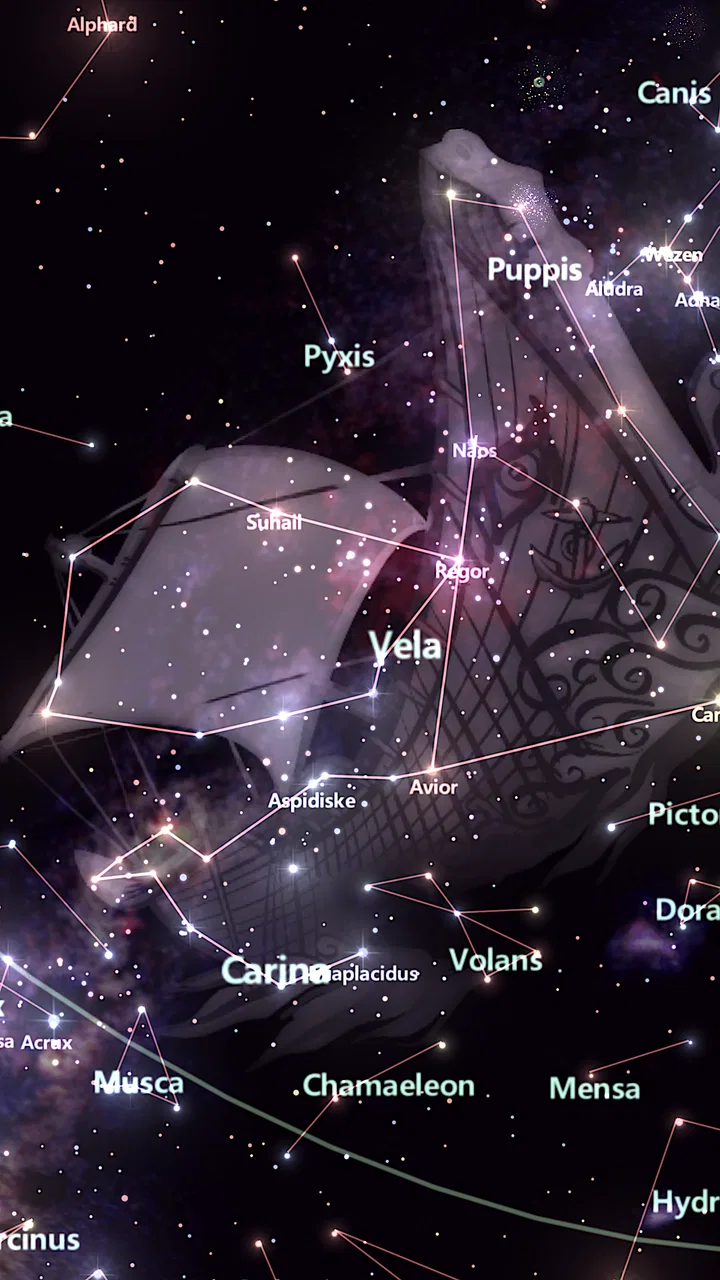
The first thing I noticed is that the app makes the sky feel less anonymous. Instead of seeing a bright point and wondering whether it is a star or a planet, I can point the phone upward and use the map as a visual guide. The experience is especially helpful when only a few objects are visible, such as during a short evening walk or from a balcony where buildings hide much of the horizon.
I would not treat it as a passive wallpaper or a simple list of celestial names. Its real purpose is interactive orientation. I move the phone across the sky, compare the screen with what is above me, and use the labels to build a mental connection between the digital map and the actual view. That makes it more useful than reading a constellation chart indoors, because the information appears in the same direction as the object I am trying to find.
A practical example is a family outing after dinner. A child may notice one bright object and ask what it is. Rather than giving a vague answer, I can open the app, aim toward it and use the identification view to turn the question into a short lesson. The child gets an answer, but also learns that nearby points belong to larger patterns. That small shift—from naming one object to understanding its surroundings—is where the educational value becomes clear.
The app also works well for beginners who feel overwhelmed by astronomy terminology. Constellation names can seem like a collection of unrelated words when they are presented in a book. On a mobile sky map, the relationships become easier to follow because the shapes occupy a visible position in the sky. I found that this encouraged me to keep looking instead of giving up after recognizing only the brightest object.
There is a useful difference between using it indoors and taking it outside. Indoors, I can explore the map casually and become familiar with the layout. Outdoors, I use it as a locator, checking whether the screen’s orientation matches the sky in front of me. The first approach is good for learning names; the second is better for developing confidence in actual observation.
What makes the free access worthwhile
The free entry point is the strongest part of the value proposition. I can install the app, test whether the pointing and identification approach suits me, and decide later whether optional purchases are worthwhile. That is a better arrangement for casual users than paying before discovering whether a phone-based sky map feels natural in their hands.
Free access also makes sense for occasional use. If I only want help identifying a bright object during a camping trip or a clear evening, I do not need to turn the app into a serious hobby purchase. The basic experience can serve as a quick reference, especially when I do not have a printed chart nearby.
The optional purchases, priced between $0.99 and $2.99 per item, are small enough to consider individually, but I would still judge them by frequency of use. A person who opens the app several times each month may see more value in expanding the experience than someone who uses it once. Since the free version gives people a chance to evaluate the app first, I recommend delaying any purchase until after a few real outdoor sessions.
This is an important trade-off: the app is inexpensive to try, but “free” does not automatically mean every possible part of the experience is included. I would approach the purchase screen as an optional upgrade decision rather than assuming that every extra is essential. For a beginner, the free access is enough to determine whether the app improves their observations.
Where it helps more than a traditional chart
A printed star chart has one major advantage: it does not depend on a battery or a bright screen. It can also be easier to study slowly at a table. However, a chart requires me to translate a flat page into the real sky. That translation is often the hardest part for newcomers, particularly when the visible horizon does not match the orientation of the page.
Star Tracker’s advantage is immediate spatial feedback. I can hold the phone toward the area I am examining instead of rotating a paper chart and guessing. This is especially useful when I am learning constellations for the first time. The app reduces the initial friction between curiosity and recognition.
Compared with a general web search, it is also more convenient outside. Searching for “bright star in the west” may produce explanations, but it does not place the information directly over the direction I am viewing. The sky-map format is more direct for identification, while a browser remains better for detailed background reading after I know the object’s name.
Dedicated astronomy software may be a better choice for experienced observers who want highly technical information, detailed planning or a deeper research workflow. I would not choose this app expecting the same depth as a specialist tool. Its strength is approachability: it gives a curious person a clear starting point without requiring prior knowledge.
Small habits that improve the experience
My first practical tip is to identify the brightest object before trying to understand an entire constellation. Bright points are easier to match between the screen and the sky, and that first successful match gives the rest of the map a useful anchor. Once I have one reliable reference, I can move outward and compare nearby stars.
My second tip is to use the app before going outside, not only once I am already under the sky. A short indoor session helps me recognize the names and general shapes I am likely to encounter. This reduces the temptation to wave the phone randomly outdoors while trying to decode every label at once.
My third tip is to lower my expectations on a cloudy or brightly lit night. The app can show where objects are located, but it cannot make faint objects visible through clouds, haze or strong urban lighting. In those conditions, I use it as a learning map rather than an observation tool. That distinction prevents disappointment and makes the app useful even when the sky itself is not ideal.
I also find it helpful to make the phone a secondary reference instead of staring at it continuously. I look at the map, identify a target area, then lower the screen and try to find the corresponding pattern with my eyes. This turns the app from an electronic label maker into a training aid. Over time, that workflow is more rewarding than simply reading names from the display.
For children, I would turn the session into a short challenge: choose one constellation, find its brightest nearby reference point, and then locate the rest of the pattern. That keeps the activity focused and avoids the common problem of presenting too much information at once. The app is most effective when it supports a question or a specific search rather than becoming a stream of labels.
Limitations I noticed before recommending it
A phone screen is both the app’s strength and its main compromise. It gives me an interactive map, but the display can compete with the darkness I am trying to preserve for stargazing. I prefer to look briefly, memorize the direction, and then return my attention to the real sky. Anyone expecting a completely screen-free astronomy experience will be happier with a paper chart or a simple red-light setup.
Orientation can also require patience. When the map does not seem to line up with what I see, I do not immediately assume that the object is missing. I first check how I am holding the device and whether my viewing direction is clear. A phone-based locator is only as intuitive as the alignment between the handset, the user and the sky, so beginners should expect a short adjustment period.
The app is not a substitute for visibility. A label on the screen does not mean that my eyes will see the object under local conditions. This matters most in cities, where light pollution can erase many of the stars that the map indicates. The app can still teach me where those objects belong, but it cannot provide the visual contrast that a dark location offers.
I also would not use it as my only source for serious astronomical study. Someone who wants extensive object details, observation planning or a more technical catalog should compare it with a specialist astronomy application. Star Tracker is better understood as an accessible locator and learning companion. That is not a flaw in itself, but choosing it for advanced research would create the wrong expectations.
Another consideration is how much information a beginner actually wants. The ability to explore stars, planets and constellations is inviting, yet a wide sky can quickly become visually busy. I get more from the app when I choose a single target and ignore the rest temporarily. Users who prefer a minimal interface may need to spend time finding a comfortable way to focus their attention.
Who will get the most from it
I recommend it most strongly to people who regularly look up and recognize very little. It gives those users a practical bridge from curiosity to identification. It is also a good fit for families, teachers introducing a basic astronomy activity, travelers who want a lightweight sky reference, and casual observers who do not want to begin with a complicated specialist tool.
The Everyone age rating makes it suitable for shared use, but younger children will still benefit from an adult guiding the activity. The app can answer “what is that?” quickly, while an adult can add the more valuable follow-up: why the object is visible, how constellations are arranged, and how to compare the screen with the sky.
It is less suitable for someone who already knows the constellations and wants an advanced observing system. Experienced users may find a dedicated astronomy application more useful for planning and detailed study. I would also skip it if I wanted a completely offline-feeling, low-distraction experience with no screen involved; a printed chart is better for that particular preference.
The developer, PYOPYO Studio, has kept the app positioned as an approachable education tool rather than a demanding technical instrument. That makes it easy to recommend as a first step. I would not describe it as the final tool an astronomy enthusiast will ever need, but I do think it can be the tool that makes a beginner want to learn more.
My buy-or-skip verdict
For me, the buying decision is straightforward because the app can be tried for free. I would install it before spending anything, take it outside on a clear evening, and test whether the map aligns comfortably with the objects I want to identify. If the free experience becomes part of my routine, an optional item costing from $0.99 to $2.99 could be reasonable, but I would only buy what adds clear value to my own use.
The app delivers its best value when I treat it as a guided introduction to the sky. It helps answer immediate questions, supports family learning and makes the first steps into constellation recognition less intimidating. Its limitations—screen dependence, alignment friction and the gap between mapped objects and what urban skies reveal—are real, but they are manageable when I use it with realistic expectations.
With more than ten million installs and a 4.6 average from around eighty-one thousand ratings, it has clearly found a broad audience. My recommendation is aimed at the person behind those numbers: if you want a friendly way to identify what is above you, this is worth trying. If you need advanced astronomical research or prefer traditional observation tools, choose something more specialized instead.
My final advice: start with the free access, use it outdoors rather than judging it from a quick indoor glance, and let your own observing habits decide whether the optional purchases are worthwhile. For casual stargazing and beginner education, Star Tracker is a useful companion that earns its place on a phone without pretending to replace the real night sky.
FAQs for Star Tracker - Mobile Sky Map
01What is Star Tracker - Mobile Sky Map and how does it work?
Star Tracker - Mobile Sky Map is an app designed to help users explore the night sky. Using augmented reality, it overlays star maps onto your device's camera view. Simply point your phone towards the sky, and the app will identify stars, constellations, and planets in real-time, providing an educational and interactive stargazing experience.
02Does Star Tracker require an internet connection to function?
No, Star Tracker - Mobile Sky Map does not require an internet connection to identify celestial bodies. It uses your device’s GPS and internal sensors to provide accurate information about the night sky. However, an internet connection might be needed for initial downloads or updates to the app's database.
03Is Star Tracker suitable for beginners in astronomy?
Absolutely! Star Tracker is designed with an intuitive interface that makes it easy for beginners to navigate the sky. It provides detailed information about celestial objects and constellations, making it a great educational tool for anyone starting out in astronomy, as well as for seasoned stargazers.
04Are there any in-app purchases or ads in Star Tracker?
Yes, Star Tracker offers a free version with ads and optional in-app purchases. These purchases may include additional features such as removing ads, enhanced star maps, or specialized content. Users can enjoy the basic functionality for free, but premium features provide a more enriched experience.
05What devices are compatible with Star Tracker - Mobile Sky Map?
Star Tracker is compatible with both Android and iOS devices. It requires a device with GPS and a gyroscope for the augmented reality features to work effectively. Most modern smartphones and tablets will support the app, but it's advisable to check the app store for compatibility with specific device models.
Pros
- Intuitive interface for easy navigation.
- Accurate real-time star positioning.
- Offline mode available for remote areas.
- Customizable notifications for celestial events.
- Smooth performance with minimal lag.
Cons
- Ads can be intrusive at times.
- Limited features in the free version.
- Battery usage is relatively high.
- Occasional GPS accuracy issues.
- In-app purchases can be costly.

Star Tracker - Mobile Sky Map
Gallery